
I've had my tablet for a little over a year and it hadn't occurred to me to use it as a stitching tool. I'm finding I like it! There are several apps I use to assist me with stitching.
Historically, like many others, I've used paper and highlighters to mark my working copy of the chart I'm stitching. My favorite highlighters are the Sharpie Retractable Highlighters. I can click it on, mark, and click it off with one hand. No chance of accidentally getting highlighter on my hands or the fabric (Yes, it's happened).


So how does one go about using a tablet to stitch?
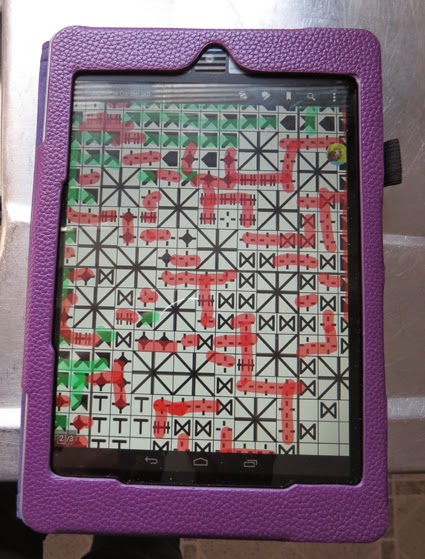
PDF Reader
Instead of making a paper working copy, I make a digital PDF scan of the chart. Then use a PDF reader app to mark off the areas stitched.
I have an android Acer tablet. Highly recommend! It has a micro SD slot. Once I scan my chart, I transfer it to the SD card and then move it to the tablet's internal memory. I don't know about other tablets, but the highlighting won't save if the PDF is not saved to the tablet's memory (vs. the SD card).
I use Adobe Reader to view my PDF files, but there are lots of other PDF apps (FoxIt, iAnnotate, and others). Some stitchers use the GoodReader app, too.

After opening the chart in Adobe Reader, several icons appear in the upper right of the screen. Tap the second one from the left which is the note bubble/pencil icon. The next set of icons has a highlighter icon (second from the left) and a pencil icon (sixth from the left). You will always use the pencil icon to highlight your chart if your scanned chart is an image-only (bitmap/graphic) PDF. The highlighter icon only works with a scanned document that is a searchable PDF (OCR has been performed on the scanned doc and it contains text, not just an image/graphic/bitmap).

A new set of icons appears once you select the pencil icon:

• checkmark = save
• left arrow = undo
• right arrow = redo
• square lines = pencil line width
• colored square = pencil color
• black and white checkered square = opacity

Second, I choose my pencil color. Adobe Reader has ten colors to choose from.

Lastly, I choose the pencil line width. I've found that 3 or 5 works best for me.

Once the selections are made, it's time to stitch and mark off the chart. I use my finger to draw the lines, but do have a stylus with a narrow tip on order. I found the wide tip styluses don't work very well for line drawing... at least not on my tablet or on a Samsung Galaxy either.
If a highlight mistake is made, I just use the left arrow to undo. I usually save (checkmark) often, too. If you have to frog and restitch, you can just choose another color and highlight over the existing color.

 Time Tracker
Like PDF readers, there are several time tracker apps. I've been using Time Meter Time Tracker by Kapp Development. It's a quick and easy time tracker for anything. Prior to tablet stitching, I used a small notebook or post-it notes to keep track of the time I spend on stitching various projects. With Time Meter, I simply press start and stop once the project name and label is entered. Easy-peasy.

The app eliminates need for paper and pencil and is much more accurate than me trying to remember when I start vs. when I end.

Beginning Stitchers
For fun, I downloaded Cross-stitch App by Happy Frog Studio. It's a pretty helpful app. It has a page that discusses the history of cross stitch. Other pages link to You Tube videos on how to stitch and design cross stitch patterns. The last page is a link to the DMC website with all the free charts.
Fabric Calculator
Stitching the Night Away has a nice Fabric Calculator app to figure out what fabric size is needed for a project. It's free, but for 99cents you can remove advertising.
So far for the apps I've tried, I really like using the tablet in conjunction with my stitching. There's no paper or highlighters/colored pencils to keep track of. The chart can be enlarged or reduced in an instant. Working copies for different projects can be kept on the tablet. No post-it notes. Accurate time tracking.
Historically, like many others, I've used paper and highlighters to mark my working copy of the chart I'm stitching. My favorite highlighters are the Sharpie Retractable Highlighters. I can click it on, mark, and click it off with one hand. No chance of accidentally getting highlighter on my hands or the fabric (Yes, it's happened).
So how does one go about using a tablet to stitch?
PDF Reader
Instead of making a paper working copy, I make a digital PDF scan of the chart. Then use a PDF reader app to mark off the areas stitched.
I have an android Acer tablet. Highly recommend! It has a micro SD slot. Once I scan my chart, I transfer it to the SD card and then move it to the tablet's internal memory. I don't know about other tablets, but the highlighting won't save if the PDF is not saved to the tablet's memory (vs. the SD card).
I use Adobe Reader to view my PDF files, but there are lots of other PDF apps (FoxIt, iAnnotate, and others). Some stitchers use the GoodReader app, too.
After opening the chart in Adobe Reader, several icons appear in the upper right of the screen. Tap the second one from the left which is the note bubble/pencil icon. The next set of icons has a highlighter icon (second from the left) and a pencil icon (sixth from the left). You will always use the pencil icon to highlight your chart if your scanned chart is an image-only (bitmap/graphic) PDF. The highlighter icon only works with a scanned document that is a searchable PDF (OCR has been performed on the scanned doc and it contains text, not just an image/graphic/bitmap).
A new set of icons appears once you select the pencil icon:
• checkmark = save
• left arrow = undo
• right arrow = redo
• square lines = pencil line width
• colored square = pencil color
• black and white checkered square = opacity
The first thing I do is set the opacity to the second icon. This allows me to see the chart symbols after highlighting.
Second, I choose my pencil color. Adobe Reader has ten colors to choose from.
Lastly, I choose the pencil line width. I've found that 3 or 5 works best for me.
Once the selections are made, it's time to stitch and mark off the chart. I use my finger to draw the lines, but do have a stylus with a narrow tip on order. I found the wide tip styluses don't work very well for line drawing... at least not on my tablet or on a Samsung Galaxy either.
If a highlight mistake is made, I just use the left arrow to undo. I usually save (checkmark) often, too. If you have to frog and restitch, you can just choose another color and highlight over the existing color.
Like PDF readers, there are several time tracker apps. I've been using Time Meter Time Tracker by Kapp Development. It's a quick and easy time tracker for anything. Prior to tablet stitching, I used a small notebook or post-it notes to keep track of the time I spend on stitching various projects. With Time Meter, I simply press start and stop once the project name and label is entered. Easy-peasy.
The app eliminates need for paper and pencil and is much more accurate than me trying to remember when I start vs. when I end.
Beginning Stitchers
For fun, I downloaded Cross-stitch App by Happy Frog Studio. It's a pretty helpful app. It has a page that discusses the history of cross stitch. Other pages link to You Tube videos on how to stitch and design cross stitch patterns. The last page is a link to the DMC website with all the free charts.
Fabric Calculator
Stitching the Night Away has a nice Fabric Calculator app to figure out what fabric size is needed for a project. It's free, but for 99cents you can remove advertising.
So far for the apps I've tried, I really like using the tablet in conjunction with my stitching. There's no paper or highlighters/colored pencils to keep track of. The chart can be enlarged or reduced in an instant. Working copies for different projects can be kept on the tablet. No post-it notes. Accurate time tracking.


